|
Dear newsletter subscribers,
We have finally come to the end of our development for SynthMaster 2.5, and we are proud to announce the "Release Candidate" version of SynthMaster 2.5. The release candidate comes with installers on both platforms, so it's very easy to install it, simply download the zip archive, extract it, and click on the setup program that's inside the archive.
The release candidate comes with 100 new presets by our designers Teoman Pasinlioglu and Mr.Shoufuku. Those presets are exclusively available for our registered users, but you can checkout the audio demos in this newsletter to get an idea of how they sound.
We still have some things to finish before our final release, particulary our User Manual, and the remaining factory presets by:
- BigTone (50 factory presets)
- Xenox.AFL (50 factory presets)
- Insigna (50 factory presets)
If everything goes as planned we should release our official final version of SynthMaster 2.5 in 2 weeks. Since we are still in "release candidate" stage, we are continuing our %20 sale until the final release, so just grab it at $79 while you can, and support the development of this great software synthesizer!
Below you will see the list of major features we have added since we announced "beta" status:
SFZ Sample Playback
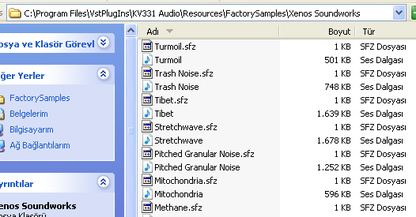
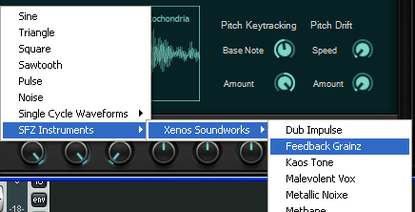
Starting with version 2.5.1.39, we added SFZ sample playback support, so that you can bring your SFZ instruments to SynthMaster. The SFZs along with their WAV samples are by default located at:
\Resources\FactorySamples
Drag-N-Drop SFZ Generation from Multisampled WAVs
Starting with version 2.5.1.55, we added this handy feature so that you can easily import your multisampled WAV samples into SynthMaster. The import flow is very simple:
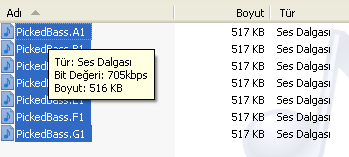
1. Prepare your WAVs first: You can set the root note inside the WAV header using your audio editor, or just embed it in the name of the WAV, such as: Piano.C5.wav
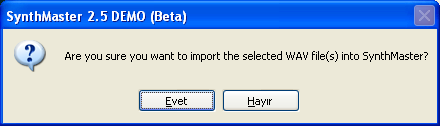
2. Select WAVs, and drag-n-drop them onto a osc waveform view in SynthMaster:
3. SynthMaster copies the WAVs and generates the SFZ for you automatically! If the multisamples contain velocity regions, you can also embed this information within the name of WAV, as follows:
Piano.C3.0.63.wav
Piano.C3.64.95.wav
Piano.C3.96.127.wav
Stereo Oscillators
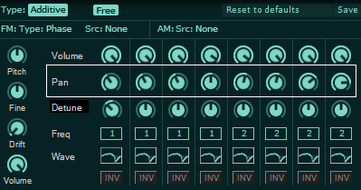
Starting with version 2.5.1.45, each oscillator has its own pan parameter, and hence has stereo output. Additive oscillators, on the other hand, has 8 separate pan parameters for each of the basic oscillators they contain:
Upto 8 "Voices" Per Each Basic/Wavescanning Oscillator
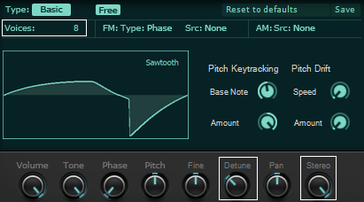
The unison implementation in SynthMaster was consuming unnecessary resources, so we decided to offer a better alternative, by introducing the "Voices" parameter for basic/wavescanning oscillators. By increasing "voices", you can play multiple oscillators, each with its own Pan and Detune adjustable using Detune and Stereo Spread parameters, as shown below:
Scala Tuning
Our release would be "incomplete" without any sort of tuning support, so starting in version 2.5.1.58, SynthMaster can now load tuning definions in Scala format The tuning files are located at:
\Scales
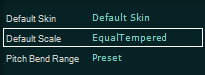
You can set the tuning table either at the preset level, or globally:
Better Arpeggiator
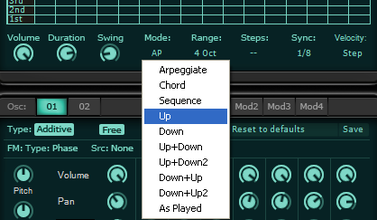
SynthMaster already features a very powerful arpeggiator, but we've made it even better by adding standart arpeggiator modes such as Up,Down,UpDown,DownUp,As Played:
Antialiased Drawing
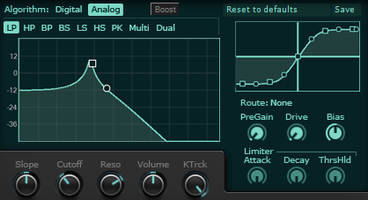
Starting with version 2.5.1.56, container views on the plugin user interface, such as the filter spectrum views, EQ views, waveform views, envelope views, distortion views, etc are drawn at a higher quality, by using "antialiased" drawing:
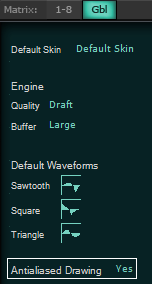
"Antialiased" drawing takes much more CPU resources compared to regular drawing, therefore we also added the option to turn it on/off:
"MIDI Learn" For Assigning MIDI Controller Buttons to Preset Browser
SynthMaster comes with a very powerful preset browser, so it was time to integrate that to your MIDI Controller so that you can browse the presets right from your controller! There are 2 major steps you need to take to achieve the integration:
1. Configure your controller to send MIDI CC messages when buttons on the controller are pressed. For instance CC 101, Value 1 for button 1, CC 101, Value 2 for button 2, etc.
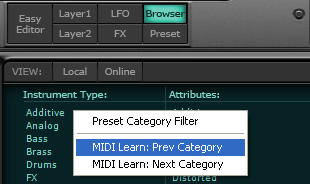
2. Configure the preset browser on the plugin user interface, by right clicking on the approriate browser list (Instrument type, Music style, Author, Preset List) and selecting the menu for the prev/next action:
Mod Matrix Improvements
The modulation architecture in SynthMaster is very powerful, so we needed better ways to display the mod matrix and filter its display. We've added the following filters to the mod matrix:
1. No Filter: No filtering is applied at all. All mod matrix entries are shown. Scrolling through the mod matrix entries is possible by using the mouse wheel.
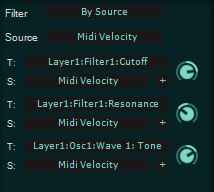
2. Filter By Source: The matrix entries are filtered by modulation source:
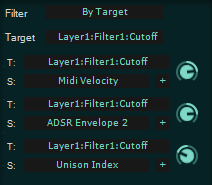
3. Filter By Target: The matrix entries are filtered by modulation target:
4. Automatic: In this mode, the mod matrix displays the entries for the last clicked knob (i.e. Layer 1:Filter 1:Cutoff)
Aside from the above changes, we've increased the number of mod matrix entries to 32.
|